
Code block
Fenced code with syntax highlighting, a language label and a copy button.
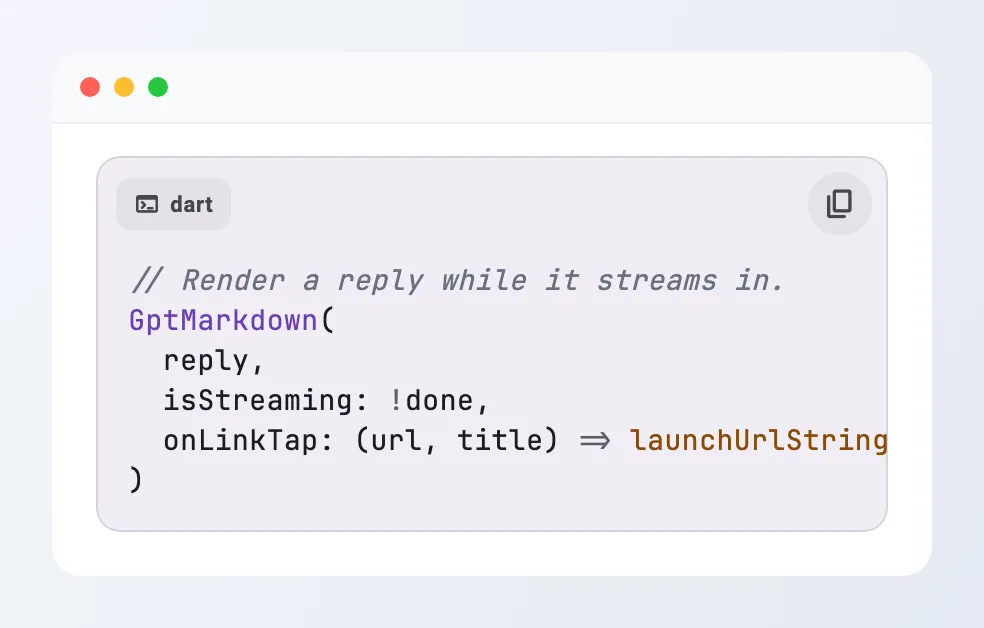
```dart// Render a reply while it streams in.GptMarkdown( reply, isStreaming: !done, onLinkTap: (url, title) => launchUrlString(url),)```Syntax
Section titled “Syntax”``` or ~~~ fences. A language tag highlights the code; an unknown
or missing tag shows it as plain monospace, and a missing tag labels the block
Code. The copy button calls onCodeCopy after a successful copy.
GptMarkdown(reply, onCodeCopy: (code) => analytics.log('code_copied'))Styling
Section titled “Styling”styleSheet: const GptMarkdownStyleSheet( codeBlock: CodeBlockStyle( backgroundColor: Color(0xFF1E1E1E), textColor: Color(0xFFD4D4D4), borderRadius: Radius.circular(12), padding: EdgeInsets.all(20), fontFamily: 'GeistMono', showLanguageLabel: true, showCopyButton: true, ),),Localise the copy-button tooltip without replacing the block:
codeBlock: CodeBlockStyle( copyLabel: AppLocalizations.of(context).copyCode, copiedLabel: AppLocalizations.of(context).copied,),React to a copy:
GptMarkdown(text, onCodeCopy: (code) => analytics.log('code_copied'))Syntax highlighting
Section titled “Syntax highlighting”Fenced blocks are highlighted automatically when the opening fence names a recognized language:
```pythondef greet(name: str) -> str: return f"Hello, {name}!"```The built-in highlighter registers 57 language grammars and follows the
active light or dark brightness. Common fence aliases include js, ts,
py, python3, c++, sh and yml. Unknown tags fall back to plain
monospace code, and an omitted tag displays Code in the header.
While a fence is still open the block is highlighted again on every source
update. highlightWhileStreaming: false holds plain monospace until the closing
fence arrives and highlights once, which is worth setting when replies stream
long blocks. It defaults to true because that is what the package did before the
field existed.
No syntax-theme field is exposed. CodeBlockStyle controls the panel, font and
base/fallback text appearance; the built-in token palette is automatic. When
an application needs its own tokenizer or token colors, replace the complete
block with the existing codeBuilder.
The built-in copy action keeps the code unchanged, briefly changes its icon to
a check, ignores repeated taps during that state, and invokes onCodeCopy
after the clipboard write succeeds.
GptMarkdown( text, codeBuilder: (context, name, code, closed) => Container( width: double.infinity, padding: const EdgeInsets.all(12), color: Theme.of(context).colorScheme.surfaceContainerHighest, child: SelectableText(code, style: const TextStyle(fontFamily: 'monospace')), ),)closed is false while a fence is still being streamed — useful for showing a
“generating” state.
API reference
Section titled “API reference”CodeBlockStyle
Section titled “CodeBlockStyle”How a fenced code block is drawn.
Set it as GptMarkdownStyleSheet(codeBlock: CodeBlockStyle(…)) on the widget, or in GptMarkdownThemeData for the whole app. Every field is optional; an unset one falls back to the theme, then to the default.
| Field | Type | Description |
|---|---|---|
highlightWhileStreaming |
bool? |
Whether to highlight an unfinished fence on every source update. Defaults to true for compatibility. False renders plain code until the closing fence arrives, avoiding repeated highlighting of large blocks. |
backgroundColor |
Color? |
Panel fill. Defaults to ColorScheme.surfaceContainer. |
borderColor |
Color? |
Panel outline. Defaults to ColorScheme.outlineVariant. |
borderWidth |
double? |
Outline thickness. Defaults to 1 when a colour is set. |
borderRadius |
Radius? |
Corner rounding. Defaults to 12. |
padding |
EdgeInsetsGeometry? |
Space around the code. Defaults to 16, with a tighter top inset. |
headerPadding |
EdgeInsetsGeometry? |
Space around the header row. |
fontFamily |
String? |
Code font. Defaults to the bundled JetBrains Mono. |
fontFamilyPackage |
String? |
Package the font ships in. |
fontSize |
double? |
Code size. Defaults to the surrounding size. |
textColor |
Color? |
Code colour. Defaults to the surrounding colour. |
showLanguageLabel |
bool? |
Whether the language is shown. Defaults to true. |
languageStyle |
TextStyle? |
Style of that label. |
showCopyButton |
bool? |
Whether the copy button is shown. Defaults to true. |
copyLabel |
String? |
Accessible copy-button tooltip. Defaults to Copy code. |
copiedLabel |
String? |
Accessible copy-button tooltip after copying. Defaults to Copied!. |
| Member | Type | Description |
|---|---|---|
merge(CodeBlockStyle? other) |
CodeBlockStyle |
This style, with any unset field taken from other, field by field. |
resolve(ColorScheme scheme) |
CodeBlockStyle |
This style with every remaining default filled in. |
copyWith({…}) |
CodeBlockStyle |
A copy with the given fields replaced. |
static lerp(CodeBlockStyle? a, CodeBlockStyle? b, double t) |
CodeBlockStyle? |
Linearly interpolates between two styles. |
codeBuilder
Section titled “codeBuilder”The code builder.
typedef CodeBlockBuilder = Widget Function( BuildContext context, String name, String code, bool closed,);onCodeCopy
Section titled “onCodeCopy”Called with the code after a code block’s copy button is used.
void Function(String code)? onCodeCopy