
Highlighted TextField
Highlight a TextField you already have with HighlightTextController, and give it CodeField's typing behaviour with CodeEditingFormatter.
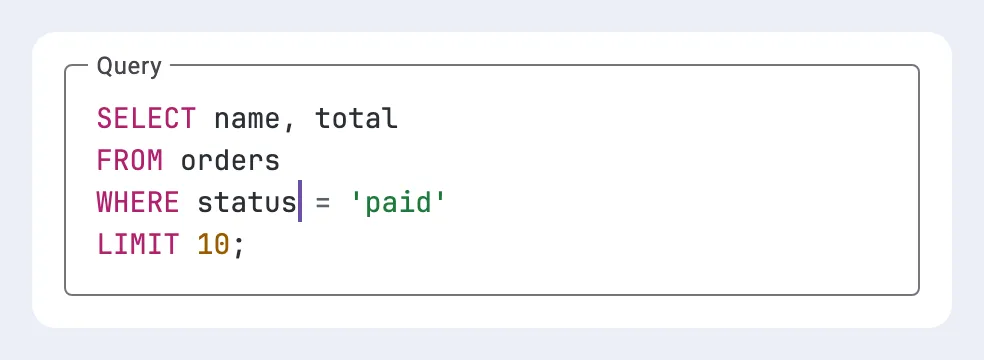
import 'package:material_ui/material_ui.dart';import 'package:val_highlight/languages/sql.dart';import 'package:val_highlight_flutter/val_highlight_flutter.dart';
class QueryField extends StatefulWidget {  const QueryField({super.key});
  @override  State<QueryField> createState() => _QueryFieldState();}
class _QueryFieldState extends State<QueryField> {  final controller = HighlightTextController(    language: sqlLanguage,    text: "SELECT name, total\nFROM orders\nWHERE status = 'paid'\nLIMIT 10;",  );
  @override  void dispose() {    controller.dispose();    super.dispose();  }
@override Widget build(BuildContext context) { return Padding( padding: const EdgeInsets.all(16), child: TextField( controller: controller, maxLines: null, style: CodeTheme.textStyleOf(context), decoration: const InputDecoration( labelText: 'Query', border: OutlineInputBorder(), ), inputFormatters: [CodeEditingFormatter(controller: controller)], ), ); }}HighlightTextController is a TextEditingController that highlights its
text, so any TextField can use it — with your own InputDecoration, label
and border, as in the example. Each edit re-highlights only the lines it can
affect.
final controller = HighlightTextController( language: sqlLanguage, text: 'SELECT 1;',);| Parameter | What it does |
|---|---|
language |
Required. The grammar to highlight with. Set controller.language later to switch; the text is highlighted again. |
text |
The initial text. |
theme |
A ValTheme. Without one, the controller follows CodeTheme and the app’s brightness. Settable as controller.theme. |
registry |
A LanguageRegistry that resolves languages named inside the text, such as Markdown code fences. |
Give the field a monospace style: CodeTheme.textStyleOf(context) is the one
the package’s widgets use.
Typing like CodeField
Section titled “Typing like CodeField”CodeEditingFormatter brings CodeField’s typing to a plain TextField:
brackets and quotes that close themselves, typing over a selection to wrap
it, and Enter that keeps the indentation. Add it to inputFormatters, as the
example does. It takes editing and indent, like CodeField.
Keys are CodeField’s own: a plain TextField gets no Tab, Shift+Tab or
Ctrl+/ shortcuts, no bracket marks and no line numbers. When you need those,
use CodeField.
Long text
Section titled “Long text”A plain TextField colours the whole text, and Flutter lays all of it out on
every change. For long text, use CodeField, which colours only the lines on
screen, or set controller.window to the zero-based lines to colour:
controller.window = (first: 0, last: 199);API reference
Section titled “API reference”HighlightTextController
Section titled “HighlightTextController”A TextEditingController that highlights its text as you type.
final controller = HighlightTextController(language: dartLanguage);TextField(controller: controller, maxLines: null, style: monospace);Edits are highlighted incrementally: only the lines an edit can affect are re-scanned, so typing stays fast in large documents.
HighlightTextController({ String? text, required Grammar language, ValTheme? theme, LanguageRegistry? registry,})Creates a controller for language.
theme defaults to CodeTheme or the built-in theme for the app’s
brightness. registry resolves languages named inside the text, such
as Markdown code fences.
| Member | Type | Description |
|---|---|---|
window |
({int first, int last})? |
Zero-based lines to colour, or null for all of them. Settable. |
language |
Grammar |
The language of the text. Setting it re-highlights everything. Settable. |
theme |
ValTheme? |
The theme, or null to follow the app. Settable. |
result |
HighlightResult |
The highlight result for the current text. |
window: more
Laying out a text field with many thousands of styled runs is slow, so
for large documents only the visible lines, plus a margin, need
colours. CodeField sets this automatically as you scroll.
CodeEditingFormatter
Section titled “CodeEditingFormatter”Applies CodeEditing to text typed into a field driven by a
HighlightTextController.
CodeField installs one automatically. Add one to a plain TextField’s
inputFormatters to get the same behaviour there:
TextField( controller: controller, maxLines: null, inputFormatters: [CodeEditingFormatter(controller: controller)],)It reacts to text changes rather than key presses, so it works the same with hardware keyboards, on-screen keyboards and voice input. Text being composed by an input method is never changed. Each change it makes is a single edit, so one undo reverts it.
CodeEditingFormatter({ required HighlightTextController controller, CodeEditing editing = const CodeEditing(), String indent = ' ',})Creates a formatter for controller.
| Field | Type | Default | Description |
|---|---|---|---|
controller |
HighlightTextController |
required | The controller whose highlighting tells strings and comments apart. |
editing |
CodeEditing |
const CodeEditing() |
The behaviour to apply. |
indent |
String |
' ' |
One level of indentation, for Enter. |