
Getting started
Add val_highlight to a Flutter app or a Dart project, show your first highlighted code, and render highlighted HTML.
Pick the package that matches your project: val_highlight_flutter for a
Flutter app, val_highlight for pure Dart — a server, a command-line tool or
a static site generator.
Install
Section titled “Install”flutter pub add val_highlight_flutter val_highlight material_uiA Flutter app lists val_highlight too, because languages and themes are
imported from package:val_highlight/…, and Dart’s recommended lints
(depend_on_referenced_packages) flag imports from a package you don’t
depend on. material_ui is explained below.
dart pub add val_highlight| Package | Requires |
|---|---|
val_highlight |
Dart 3.9 or later. No Flutter and no dart:io, so it runs on the Dart VM, in Flutter and on the web. |
val_highlight_flutter |
Flutter 3.44.0 or later, with Dart 3.12 or later. |
Show code in Flutter
Section titled “Show code in Flutter”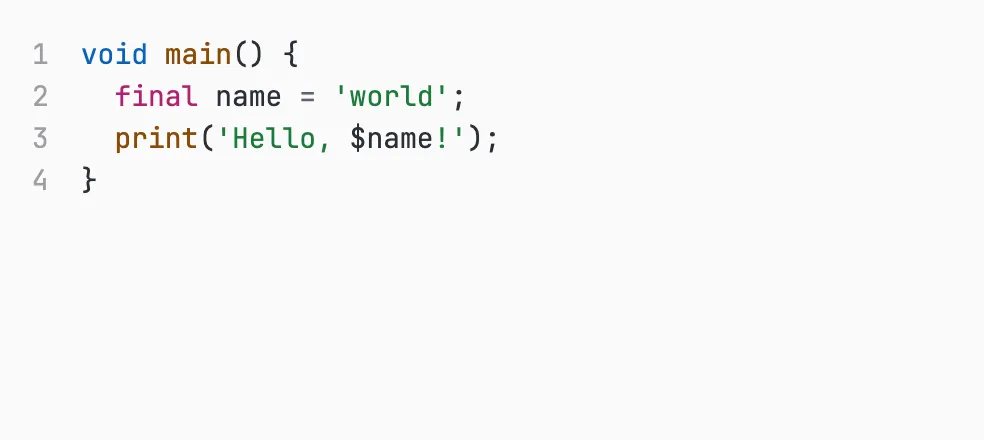
import 'package:material_ui/material_ui.dart';import 'package:val_highlight/languages/dart.dart';import 'package:val_highlight_flutter/val_highlight_flutter.dart';
void main() => runApp(const App());
const source = r'''void main() {  final name = 'world';  print('Hello, $name!');}''';
class App extends StatelessWidget {  const App({super.key});
  @override  Widget build(BuildContext context) {    return const MaterialApp(      home: Scaffold(        body: SafeArea(          child: CodeView(source, language: dartLanguage, lineNumbers: true),        ),      ),    );  }}
CodeView takes the source and a language; everything else is optional. Its
theme follows the app’s brightness — lightTheme in a light app, darkTheme
in a dark one — the code can be selected and copied, and long lines scroll
sideways. CodeView shows the rest; to let
people edit code, see CodeField.
Use material_ui in your app
Section titled “Use material_ui in your app”val_highlight_flutter 0.1.2 is built on
material_ui, Flutter’s Material
library published as a package, rather than on
package:flutter/material.dart. The two libraries have separate Theme,
Material and localizations widgets, so build your app with material_ui:
import 'package:material_ui/material_ui.dart';Render HTML in Dart
Section titled “Render HTML in Dart”import 'package:val_highlight/val_highlight.dart';import 'package:val_highlight/languages/dart.dart';import 'package:val_highlight/themes/light.dart';
void main() { const source = 'final n = 42; // answer';
// HTML with CSS classes, and the stylesheet for those classes. final html = const Highlighter().toHtml( source, language: dartLanguage, renderer: const HtmlRenderer(wrap: true), ); final css = lightTheme.toCss();
print(html); print(css);}The HTML it prints:
<pre class="vh"><code><span class="vh-keyword">final</span> n <span class="vh-operator">=</span> <span class="vh-number">42</span>; <span class="vh-comment">// answer</span></code></pre>The stylesheet starts with .vh{color:#2b2f36;background-color:#fafafb;} and
has a rule per scope, such as .vh .vh-keyword{color:#b0226e;}. To do without
a stylesheet, write inline styles instead — see
HTML output.
Imports
Section titled “Imports”| Import | Gives you |
|---|---|
package:val_highlight_flutter/val_highlight_flutter.dart |
The Flutter widgets, plus everything in val_highlight.dart. |
package:val_highlight/val_highlight.dart |
The engine: Highlighter, HighlightResult, IncrementalHighlighter, HtmlRenderer, LanguageRegistry, LanguageDetector, ValTheme, Style, Scopes, EditingSyntax and more. |
package:val_highlight/advanced.dart |
The engine plus the rules and building blocks for writing a grammar. |
package:val_highlight/languages/<name>.dart |
One language, such as languages/kotlin.dart for kotlinLanguage. Every language lists its file. |
package:val_highlight/languages/all.dart |
Every language, the list allLanguages, and allLanguagesRegistry(). |
package:val_highlight/themes/<name>.dart |
One theme, such as themes/midnight.dart for midnightTheme. |
package:val_highlight/themes/all.dart |
Every theme, and the list allThemes. |
Each language and theme is a separate library of const values, so an app
includes only the ones it imports — languages/all.dart includes them all.
What each library’s own documentation says:
| Library | Description |
|---|---|
package:val_highlight/advanced.dart |
Grammar authoring for val_highlight: everything in val_highlight.dart, plus the rules and building blocks grammars are written with. |
package:val_highlight/languages/all.dart |
Every built-in language, for apps that want them all. |
package:val_highlight/themes/all.dart |
Every built-in theme. |
package:val_highlight/val_highlight.dart |
Fast, light, fully customizable syntax highlighting in pure Dart. |
package:val_highlight_flutter/val_highlight_flutter.dart |
Flutter widgets for val_highlight. |
package:val_highlight/advanced.dart: more
Import this to write or extend a grammar; validate one eagerly with
Grammar.validate. The built-in grammars use exactly this API.
package:val_highlight/languages/all.dart: more
Importing this ships every grammar. To keep an app small, import only
the languages you use from package:val_highlight/languages/<name>.dart.
package:val_highlight/themes/all.dart: more
Import a single theme from package:val_highlight/themes/<name>.dart to
ship only what you use.
package:val_highlight/val_highlight.dart: more
import 'package:val_highlight/val_highlight.dart';import 'package:val_highlight/languages/dart.dart';
final html = const Highlighter().toHtml(code, language: dartLanguage);
This is the shared core used by val_highlight_flutter. It has no
Flutter dependency. Each language and theme is its own import, so an app
only ships what it uses. The grammar rules, for writing a grammar, are
in advanced.dart.
package:val_highlight_flutter/val_highlight_flutter.dart: more
import 'package:val_highlight_flutter/val_highlight_flutter.dart';import 'package:val_highlight/languages/dart.dart';
CodeView(source, language: dartLanguage)
This library re-exports package:val_highlight/val_highlight.dart, so
one import covers the core API. Languages and themes are separate
imports under package:val_highlight/languages/ and themes/.