
MathPainter
Draw a laid-out formula on any Canvas — charts, whiteboards and custom render objects — and line custom-painted formulas up with text.
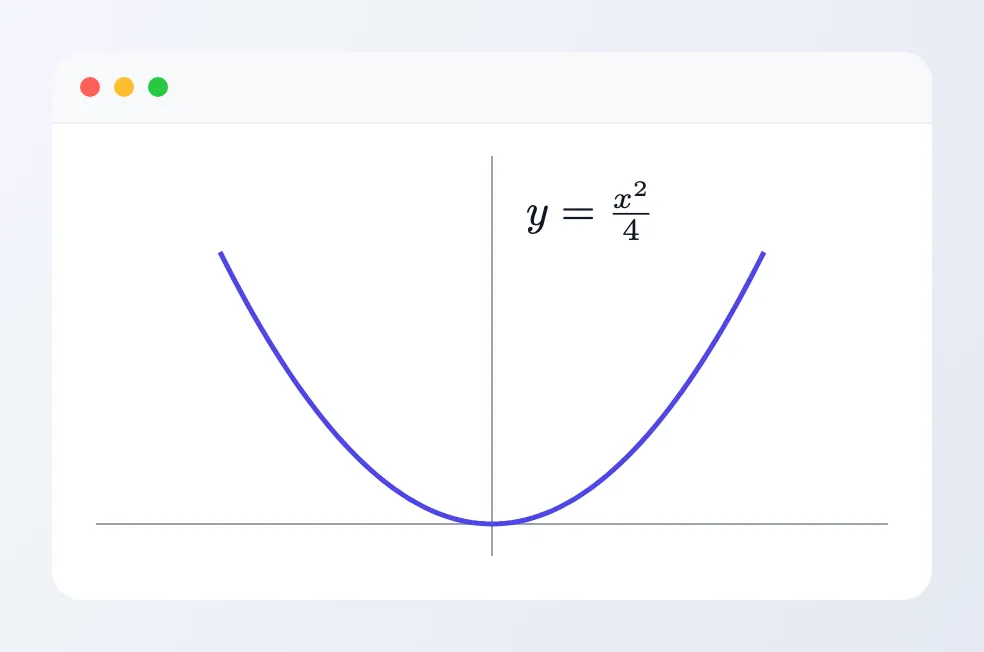
import 'package:flutter/widgets.dart';import 'package:val_latex_flutter/val_latex_flutter.dart';
/// A parabola drawn on a canvas, labelled with its formula.Widget example() => const SizedBox(  height: 200,  width: double.infinity,  child: CustomPaint(painter: ParabolaPainter()),);
/// Paints the axes, the curve y = x²/4 and its label.class ParabolaPainter extends CustomPainter {  /// Creates the painter.  const ParabolaPainter();
  // The shaper the widgets use, so text in the label matches them.  static final _shaper = mathShaperFor(MathTextFonts.latinModern);  static final _painter = MathPainter(_shaper);  static final _label = layoutFormula(    parseLatex(r'y = \frac{x^2}{4}'),    shaper: _shaper,  );
  @override  void paint(Canvas canvas, Size size) {    const unit = 34.0;    final origin = Offset(size.width / 2, size.height - 16);    final axis = Paint()      ..color = const Color(0xFF9CA3AF)      ..strokeWidth = 1;    canvas      ..drawLine(Offset(0, origin.dy), Offset(size.width, origin.dy), axis)      ..drawLine(Offset(origin.dx, 0), Offset(origin.dx, size.height), axis);
    final curve = Path();    for (var i = 0; i <= 80; i++) {      final x = -4 + i / 10;      final p = origin + Offset(x * unit, -x * x / 4 * unit);      i == 0 ? curve.moveTo(p.dx, p.dy) : curve.lineTo(p.dx, p.dy);    }    canvas.drawPath(      curve,      Paint()        ..color = const Color(0xFF4F46E5)        ..style = PaintingStyle.stroke        ..strokeWidth = 2.5,    );
    // MathPainter draws a layout with its baseline at the given origin.    _painter.paint(      canvas,      origin + const Offset(0.5 * unit, -4.4 * unit),      _label.items,      fontSize: 22,      color: const Color(0xFF111827),    );  }
  @override  bool shouldRepaint(ParabolaPainter oldDelegate) => false;}
The widgets are built from parts you can use yourself: lay a formula out
with the engine, then paint its items with MathPainter.
- Lay out with the shaper the widgets use, so text runs (
\text{…}) are measured by Flutter’s text engine:mathShaperFor(MathTextFonts.latinModern). Keep theMathLayout: painting it again does not lay it out again. - Paint with
painter.paint(canvas, origin, layout.items, fontSize: …, color: …).originis the formula’s left edge on its baseline. Sizes in the layout are in em, so a formula islayout.width * fontSizepixels wide, withlayout.height * fontSizeabove the baseline andlayout.depth * fontSizebelow.
Pass devicePixelRatio to paint to snap thin rules (fraction bars,
radical overbars, table lines) to whole device pixels. It assumes origin is
itself on the pixel grid; PixelGrid(devicePixelRatio).snapOnCanvas(canvas, origin)
puts it there.
Fonts registering
Section titled “Fonts registering”Glyphs are drawn through Flutter’s text engine once their math font has
registered with it, and filled from their outlines until then — just after
the first formula appears. For a one-off rendering (an image export), await
MathPainter.preloadFontsOf(layout.items) first so it draws as text.
Other building blocks
Section titled “Other building blocks”MathLayoutView(layout)paints an already laid-out formula as a widget at the ambient text size and colour — for example one piece fromlayoutFormulaSegments.MathBaseline(baseline: …, child: …)reports a baseline (pixels from the top) for a custom-painted child, so it lines up with text in a baselineRow, asMathdoes.ParagraphTextShaperis theTextShaperthat measures text runs with Flutter’s text engine.
API reference
Section titled “API reference”MathPainter
Section titled “MathPainter”Paints a MathLayout onto a canvas.
More about MathPainter
How each item is drawn:
- Glyphs (
GlyphItem, and aPathItemwith aPathItem.source: a turned, reflected, scaled or stretched letter) go through Flutter’s text engine (GlyphText), whose glyph rasteriser keeps small glyphs smooth where a path fill leaves curves and diagonals stepped. They are filled from their outlines instead (cached asui.Paths, seeglyphPath) only where that cannot work or would show: until their font has registered with the engine (fontsLoaded); parts of an assembly (a tall brace, a long arrow), which overlap and must fill as one path; and emboldened glyphs, whose thickening stroke defines the edge either way. - Rules and lines (
RectItem,LineItem) snap to the device-pixel grid across their thickness (PixelGrid). - Text runs (
TextItem) are paragraphs fromshaper. - Drawn shapes (
PathItemwithout a source,FillItem) are paths.
| Constructor | Description |
|---|---|
MathPainter(shaper) |
Creates a painter; shaper builds paragraphs for text runs. |
| Field | Type | Default | Description |
|---|---|---|---|
shaper |
ParagraphTextShaper |
required |
Text engine for text runs. |
| Member | Type | Description |
|---|---|---|
static glyphPath(MathFont font, int glyph) |
ui.Path |
The outline of glyph in font units, y up, as a Flutter path. |
static toFlutterPath(List<PathCommand> commands) |
ui.Path |
Converts outline commands to a Flutter path (no transform). |
static fontsLoaded |
Listenable |
Notifies when a math font finishes registering with the text engine, so formulas painted with outlines meanwhile can repaint as text. |
static fontGeneration |
int |
Increases each time fontsLoaded fires; part of a cache key for anything that records a painting. |
static preloadFont(MathFont font) |
Future<void> |
Registers font with the text engine now, rather than the first time it is painted, and completes when its glyphs can be drawn as text (or registration has failed, leaving them to their outlines). |
static preloadFontsOf(Iterable<DisplayItem> items) |
Future<void> |
preloadFont for every font items draw glyphs from: await it before a one-off rendering (an image export) so it draws text. |
paint(Canvas canvas, Offset origin, List<DisplayItem> items, {…}) |
void |
Paints items with their origin (left edge, baseline) at origin, fontSize pixels per em, and color for items without a colour. embolden thickens glyphs by that many em (for bold-text settings). A positive devicePixelRatio snaps thin rules (fraction bars, radical overbars, table lines) to whole device pixels across their thickness, so a bar stays one crisp line instead of a grey smear over two; it assumes origin is itself on the pixel grid. |
dispose() |
void |
Releases cached paragraphs. |
paint: more
void paint( Canvas canvas, Offset origin, List<DisplayItem> items, { required double fontSize, required Color color, double embolden = 0, double devicePixelRatio = 0,})mathShaperFor()
Section titled “mathShaperFor()”The shaper Math widgets use for fonts, for laying out formulas
outside a widget (e.g. with layoutFormulaSegments).
ParagraphTextShaper mathShaperFor(MathTextFonts fonts)MathLayoutView
Section titled “MathLayoutView”Paints an already laid-out formula (for example one piece from
layoutFormulaSegments) at the ambient text size and colour.
| Constructor | Description |
|---|---|
MathLayoutView(layout, {…}) |
Creates a view of layout. |
MathLayoutView: more
const MathLayoutView( this.layout, { super.key, this.textStyle, this.textFonts = MathTextFonts.latinModern,})| Field | Type | Default | Description |
|---|---|---|---|
layout |
MathLayout |
required |
The laid-out formula. |
textStyle |
TextStyle? |
Size and colour. | |
textFonts |
MathTextFonts |
MathTextFonts.latinModern |
Fonts used when it was laid out. |
MathBaseline
Section titled “MathBaseline”Reports baseline as its child’s alphabetic baseline, so custom-painted
formulas line up with text as Math.tex does.
| Constructor | Description |
|---|---|
MathBaseline({key, required baseline, child}) |
Creates the wrapper. |
| Field | Type | Default | Description |
|---|---|---|---|
baseline |
double |
required |
Distance from the top to the baseline, in pixels. |
RenderMathBaseline
Section titled “RenderMathBaseline”The render object of MathBaseline.
| Constructor | Description |
|---|---|
RenderMathBaseline(_baseline) |
Creates it. |
| Member | Type | Description |
|---|---|---|
set baseline(double v) |
Distance from the top to the baseline, in pixels. |
ParagraphTextShaper
Section titled “ParagraphTextShaper”Measures text runs with Flutter’s text engine, so every script shapes correctly: Arabic letters join, Indic clusters form, emoji sequences stay whole.
More about ParagraphTextShaper
Runs are measured at a reference size and scaled, so one shaper serves every font size.
| Constructor | Description |
|---|---|
ParagraphTextShaper([fonts = MathTextFonts.latinModern]) |
Creates a shaper using fonts. |
| Field | Type | Default | Description |
|---|---|---|---|
fonts |
MathTextFonts |
MathTextFonts.latinModern |
Font configuration. |
| Member | Type | Description |
|---|---|---|
static referenceSize = 100.0 |
Size text is measured at. | |
buildParagraph(String text, TextFont font, double size, Color? color, {…}) |
ui.Paragraph |
A laid-out one-line paragraph of text at size pixels, with base direction (default: from the first strong character). |
static firstStrongDirection(String text) |
TextDirection |
The direction of the first strong character (UAX #9 rule P2), or left-to-right. |
buildParagraph: more
ui.Paragraph buildParagraph( String text, TextFont font, double size, Color? color, { TextDirection? direction,})PixelGrid
Section titled “PixelGrid”The screen’s device-pixel grid, in logical pixels: snapping a formula’s origin and its thin rules onto it keeps a 1px bar one crisp line rather than a grey smear across two rows.
More about PixelGrid
A devicePixelRatio of 0 (unknown) snaps nothing.
| Constructor | Description |
|---|---|
PixelGrid(devicePixelRatio) |
The grid for devicePixelRatio device pixels per logical pixel. |
| Field | Type | Default | Description |
|---|---|---|---|
devicePixelRatio |
double |
required |
Device pixels per logical pixel; 0 for none. |
| Member | Type | Description |
|---|---|---|
static none = PixelGrid(0) |
No snapping. | |
snapOnCanvas(Canvas canvas, Offset o) |
Offset |
o, a point in canvas’s current coordinates, moved so it lands on a device pixel: for painters that know only their canvas (a CustomPainter), not their offset. Left alone under a transform that scales, skews or rotates. |
snap(Offset o) |
Offset |
o rounded to the nearest device pixel. |
rule(double start, double length) |
(double, double) |
One axis of a rule, start and length in logical pixels, as (start, length) on the grid when it is thin (under four device pixels): the length rounds to whole pixels, at least one, about the same centre. Longer extents are left alone, so a bar still meets the glyph it joins (a radical’s surd) exactly along its length. |