
Errors and untrusted input
How mistakes are drawn and reported, how to replace a formula that has errors, and the options that make LaTeX from users or models safe to render.
Errors are drawn in place
Section titled “Errors are drawn in place”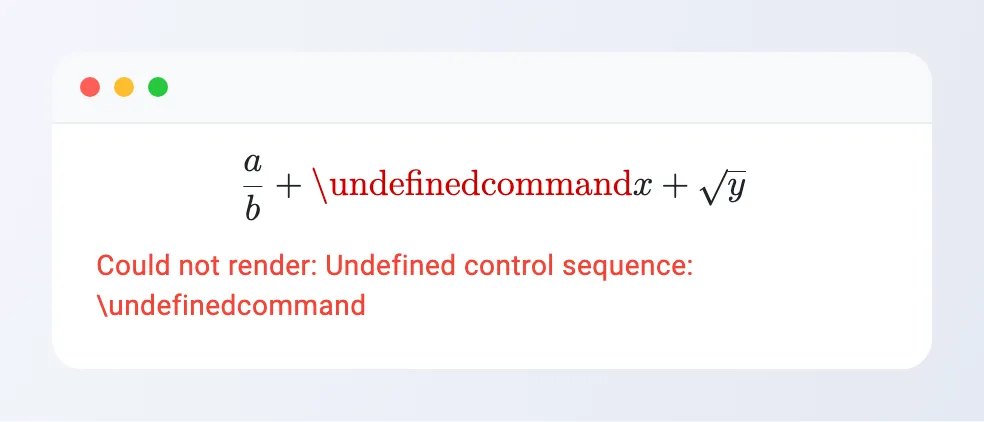
import 'package:flutter/material.dart';import 'package:val_latex_flutter/val_latex_flutter.dart';
/// A mistake drawn in place, and the same formula replaced by `onError`.Widget example() => Column(  crossAxisAlignment: CrossAxisAlignment.start,  children: [    const Math.tex(      r'\frac{a}{b} + \undefinedcommand{x} + \sqrt{y}',      displayMode: true,    ),    const SizedBox(height: 12),    Math.tex(      r'\frac{a}{b} + \undefinedcommand{x} + \sqrt{y}',      displayMode: true,      onError: (context, result) => Text(        'Could not render: ${result.errors.first.message}',        style: const TextStyle(color: Colors.red, fontSize: 14),      ),    ),  ],);
Parsing never throws for bad input. A mistake becomes an error node, drawn in
place in the error colour (MathThemeData.errorColor, or
LayoutOptions.errorColor), and the rest of the formula still renders. To
replace the whole formula instead, pass onError: it is called with the
ParseResult when the formula has errors.
Diagnostics
Section titled “Diagnostics”Every problem is a Diagnostic in ParseResult.diagnostics, with a stable
machine-readable code, a message, a span in the source and a
severity:
Severity.error— input that could not be understood; an error node marks the spot.ParseResult.hasErrorsanderrorscover these.Severity.warning— input LaTeX would reject or that was not allowed, which val_latex handled anyway (a doubled backslash, an untrusted command). The formula renders normally.
format(source) prints the message with the source line and a caret marker:
const source = r'\frac{a}{b} + \undefinedcommand{x} + \sqrt{y}';final result = parseLatex(source);
for (final error in result.errors) {  print(error.code); // undefinedControlSequence  print(error.format(source));}
Undefined control sequence: \undefinedcommand\frac{a}{b} + \undefinedcommand{x} + \sqrt{y} ^^^^^^^^^^^^^^^^^To fail fast instead, set ParseOptions(throwOnError: true): parseLatex
then throws a LatexParseException, holding the first error’s diagnostic.
strict decides what happens to input LaTeX would reject but val_latex can
handle: Strict.ignore, Strict.warn (the default: a warning) or
Strict.error. strictCallback decides case by case, from the diagnostic’s
code and message.
Untrusted input
Section titled “Untrusted input”The default ParseOptions() is safe for input you do not control — a user’s
text, a model’s reply.
Commands that need trust
Section titled “Commands that need trust”\href, \url, \includegraphics and \htmlClass are untrusted commands,
as in KaTeX. Without trust, \href and \url render their text without a
link, \htmlClass renders its content without the class, and each records
an untrusted warning. Allow them for input you control with
trust: true, or decide per command and URL with trustCallback:
final options = ParseOptions( trustCallback: (context) => context.command == r'\href' && context.protocol == 'https',);TrustContext carries the command, the url, its lower-case protocol
and the span.
Limits
Section titled “Limits”Macros can expand without end, and a few lines of input can ask for a huge table. These limits stop a parse; when one is reached the parse stops with an error, and an error node shows where.
| Option | Default | Limits |
|---|---|---|
maxExpand |
1000 |
Macro expansions. |
maxTokens |
500000 |
Tokens macro expansion may produce in one parse, all expansions together. |
maxNesting |
128 |
Depth of nested groups, arguments and environments. |
maxNodes |
100000 |
Nodes in the tree. |
maxSize |
double.infinity |
Largest dimension in em for sizes such as \rule; larger values are clamped. Lengths past TeX’s \maxdimen are clamped whatever this says. |
timeBudget |
null (no limit) |
Wall-clock time for one parse. |