
Math
One LaTeX formula as a widget — inline or in display style, with equation numbers, wrapping, errors drawn in place, taps and highlights.
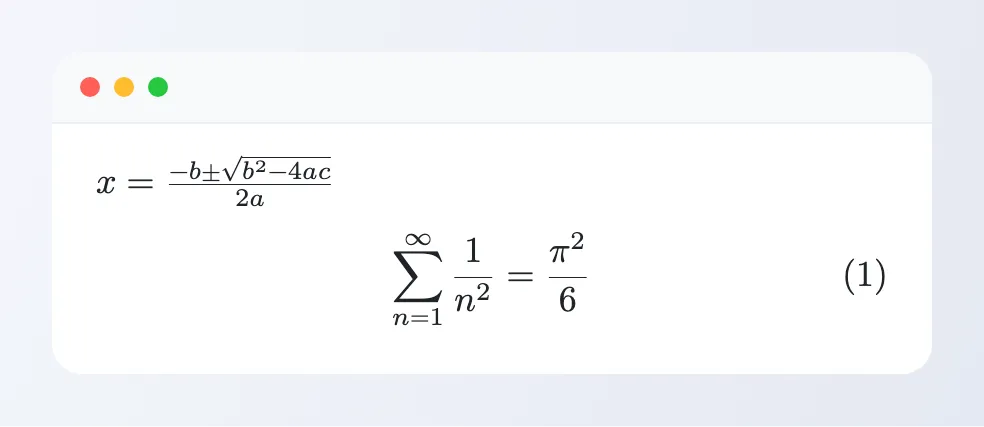
import 'package:flutter/widgets.dart';import 'package:val_latex_flutter/val_latex_flutter.dart';
/// An inline formula, then the same kind of formula in display style:/// centred, with large operators and an equation number at the margin.Widget example() => const Column(  crossAxisAlignment: CrossAxisAlignment.start,  children: [    Math.tex(r'x = \frac{-b \pm \sqrt{b^2-4ac}}{2a}'),    SizedBox(height: 12),    Math.tex(      r'\sum_{n=1}^{\infty} \frac{1}{n^2} = \frac{\pi^2}{6} \tag{1}',      displayMode: true,    ),  ],);
Math.tex renders one formula. It never throws: a mistake is drawn in place
in red and the rest of the formula still renders (or onError builds a
replacement — see Errors).
const Math.tex(r'\frac{a}{b} + \sqrt{x}')Size and colour
Section titled “Size and colour”Size and colour come from the ambient DefaultTextStyle merged with
textStyle, scaled by the platform’s text scaler. With no font size anywhere,
14 is used. A colour from a MathTheme wins
over the text style’s.
const Math.tex( r'e^{i\pi} + 1 = 0', textStyle: TextStyle(fontSize: 32, color: Colors.indigo),)Inline and display style
Section titled “Inline and display style”| Setting | Result |
|---|---|
| default | Text style ($…$): an inline box as wide as the formula. |
displayMode: true |
Display style ($$…$$): larger operators, limits above and below. The formula takes the full width, centred, with equation numbers at the margin. |
displayMode: true, block: false |
Display style, set inline: as wide as the formula. |
The widget’s displayMode overrides the displayMode in layoutOptions.
Equation numbers
Section titled “Equation numbers”Numbered environments such as equation and align number their rows;
\tag{…} sets a row’s label and \notag removes it. Use layoutOptions for
numbers on the left (leqno), formulas flush left (fleqn), or another
first number (firstEquationNumber).
const Math.tex( r'\begin{equation} E = mc^2 \end{equation}', displayMode: true, layoutOptions: LayoutOptions(leqno: true, fleqn: true),)\ref and \eqref print the number the app gives for the label in
LayoutOptions.labels (label → number text); a label not in the map prints
??, as LaTeX does before its second run.
Long formulas
Section titled “Long formulas”A block display formula breaks into lines that fit its width; what cannot
break scrolls (overflow). Inline formulas do not wrap on their own — in a
paragraph, use MathText, which wraps them with
the words. See Wrapping and overflow.
Unfinished input
Section titled “Unfinished input”Math.tex parses with ParseOptions(streaming: false): the formula is taken
as complete, so x + \frac{a}{ shows its error. For a formula that is still
arriving, pass parseOptions: ParseOptions(streaming: true); see
Streaming.
Caching and large formulas
Section titled “Caching and large formulas”Math widgets share parses and layouts through MathCache (256 of each by
default), so a formula scrolled back into a list is not laid out again. A
new width re-runs only the line breaker.
layoutInBackground: true lays a formula out in a worker isolate and paints
it when the layout arrives; the formula is empty until then. It applies only
when the formula does not wrap and its overflow is MathOverflow.visible
(the defaults for inline formulas; a block display formula needs
wrap: false, overflow: MathOverflow.visible), with the default math font
(no font, and no font or fallbackFonts in the MathTheme) and no
shared macros. Otherwise it lays out as usual. In the worker, text runs are
measured by the pure-Dart shaper, so \text{…} widths are estimates. The web
has no isolates: there the layout runs right away.
- Taps, hover, highlights, selection, keyboard navigation and screen readers: Interaction and accessibility.
- Fonts, theming and
\htmlClassstyles: Styling and fonts. - Shared macros across formulas: Supported LaTeX.
API reference
Section titled “API reference”Renders a LaTeX formula.
More about Math
const Math.tex(r'\frac{a}{b} + \sqrt{x}')Math.tex(r'\int_0^1 f(x)\,dx', displayMode: true)Size and colour come from textStyle merged over the ambient
DefaultTextStyle, scaled by the platform text scaler. Parsing never
throws: bad input shows red error text in place (or onError, if
given). The formula is taken as complete, so an unfinished command or
group at its end is an error too; for input still being typed, pass
ParseOptions(streaming: true) (parseOptions) and it renders what
it can.
| Constructor | Description |
|---|---|
Math.tex(tex, {…}) |
Creates a formula from TeX source. |
Math.tex: more
const Math.tex( this.tex, { super.key, this.displayMode = false, this.block, this.wrap, this.overflow, this.minShrink = 0.5, this.textStyle, this.parseOptions = const ParseOptions(streaming: false), this.layoutOptions, this.font, this.textFonts = MathTextFonts.latinModern, this.macros, this.onError, this.onTap, this.onLongPress, this.onHover, this.highlights = const [], this.highlightDuration = const Duration(milliseconds: 250), this.focusable = false, this.onFocusPart, this.layoutInBackground = false, this.semanticsLabel, this.speechLanguage = SpeechLanguage.english, this.speechVerbosity = SpeechVerbosity.normal, this.copyFormat = MathCopyFormat.latex,})| Field | Type | Default | Description |
|---|---|---|---|
tex |
String |
required |
The TeX source. |
displayMode |
bool |
false |
Display style ($$…$$): larger operators and limits, full width, equation numbers at the margin. |
block |
bool? |
Whether the formula takes the full width as a block, centred, with equation numbers at the margin. Defaults to displayMode; set it to false for display style set inline. |
|
wrap |
bool? |
Break long formulas into lines that fit the available width. Defaults to true for block display formulas. (Inline formulas in a paragraph wrap with the text through MathText.) |
|
overflow |
MathOverflow? |
What happens when a formula is still wider than the available space (no break fits, or wrap is off). Defaults to MathOverflow.scroll for block display formulas and MathOverflow.visible otherwise. |
|
minShrink |
double |
0.5 |
The smallest scale MathOverflow.shrink goes to; a formula that would need more scrolls instead, so it never becomes unreadable. |
textStyle |
TextStyle? |
Size and colour. | |
parseOptions |
ParseOptions |
const ParseOptions(streaming: false) |
Parse options. By default not streaming: a formula is complete, so an unfinished command or group at its end is an error. For text still arriving (an LLM reply), pass ParseOptions(streaming: true) or use MathText(streaming: true). |
layoutOptions |
LayoutOptions? |
Layout options; displayMode here is overridden by displayMode. |
|
font |
MathFont? |
The math font; defaults to the bundled Latin Modern Math. | |
textFonts |
MathTextFonts |
MathTextFonts.latinModern |
Fonts for text runs. |
macros |
MacroTable? |
A shared macro table for \gdef / \newcommand across formulas. |
|
onError |
Widget Function(BuildContext context, ParseResult result)? |
Builds a replacement when the formula has errors. When null, errors are drawn in place in the error colour. | |
onTap |
void Function(MathTap tap)? |
Called with the node under the finger (its source span, node id, \htmlClass classes and \href link). |
|
onLongPress |
void Function(MathTap tap)? |
Called with the node under a long press. | |
onHover |
void Function(MathTap? tap)? |
Called with the node under the mouse as it moves, and null when it leaves or is over empty space. | |
highlights |
List<MathHighlight> |
const [] |
Parts of the source to emphasise (e.g. the step being explained). |
highlightDuration |
Duration |
const Duration(milliseconds: 250) |
How long a change of highlights animates (zero: instantly). |
focusable |
bool |
false |
Keyboard navigation: the formula takes focus, arrow keys move between its parts (↓ into a fraction, root or group, ↑ back out), the current part is outlined and announced to screen readers. |
onFocusPart |
void Function(MathPart part)? |
Called when keyboard navigation moves to a part. | |
layoutInBackground |
bool |
false |
Lay the formula out in a worker isolate (layoutInBackground) and paint it when ready, keeping very long formulas off the UI thread. Applies to formulas that do not wrap, with the default math font and no shared macros; text runs are then measured by the pure-Dart shaper. Others lay out as usual. |
semanticsLabel |
String? |
What screen readers say. Defaults to the formula spoken in speechLanguage (toSpeech). |
|
speechLanguage |
SpeechLanguage |
SpeechLanguage.english |
Language of the default semanticsLabel. |
speechVerbosity |
SpeechVerbosity |
SpeechVerbosity.normal |
How much structure the default semanticsLabel announces. |
copyFormat |
MathCopyFormat |
MathCopyFormat.latex |
What copying the formula (inside a SelectionArea) gives. |
overflow: more
Block display formulas that wrap or overflow need the available width, so they do not report intrinsic sizes; inline formulas do.
MathOverflow
Section titled “MathOverflow”What a formula does when it is wider than its space.
| Value | Description |
|---|---|
scroll |
Scroll horizontally. |
shrink |
Scale down to fit, but not below Math.minShrink; a formula that would need more is shown at that scale and scrolls. |
clip |
Clip at the edge. |
visible |
Paint past the edge. |
MathCache
Section titled “MathCache”The parses and layouts Math widgets share, least recently used
first out: a list scrolling formulas back into view does not lay them
out again. One prepared formula per source, options and font; its
layouts per width come from re-running only the line breaker.
| Member | Type | Description |
|---|---|---|
static maxEntries = 256 |
int |
How many parses and layouts are kept (each). |
static clear() |
void |
Empties the cache (for example after loading a new math font). |